
July 2026 Updates
On This Page:
Brightspace Updates
Fall 2026 Brightspace Modernization
Brightspace Updates
Fall 2026 Brightspace Modernization
On August 17, several updates will be implemented across the University of Arizona Brightspace environment as part of the Fall 2026 Brightspace Modernization initiative. These changes are designed to create a more consistent, transparent, and user-friendly experience for both instructors and students.
New Content Experience
The New Content Experience (NCE) will become the default content interface in all Brightspace courses. If you'd like to get familiar with the new experience before the change, toggle it on and join UCATT's NCE Office Hours, held daily from 12-1 pm, August 17-21. You can also explore our newly published help pages.
Please note, the option to toggle course sites from Classic to New Content will be available until August 13 in preparation for the NCE default beginning August 17. Check out the NCE Help Pages (opens in new tab) for detailed instructions.
Navbar
All Brightspace course sites will transition to a standard navigation bar, replacing custom navbars. A consistent navigation experience makes it easier for students to find course tools and resources, regardless of which course they're taking.
Final Calculated Grade
The Final Calculated Grade will become the default grading option in all Brightspace courses, replacing Final Adjusted Grade. This change increases transparency by allowing students to view their current cumulative grade while reducing the need for instructors to manually configure grade visibility.
Yuja Panorama
Did you know YuJa Panorama is Integrated into Brightspace? When reviewing course materials, look for the Accessibility Indicator — a person inside a shape [hexagon, triangle, or octagon] with color.
This indicator provides a snapshot of the accessibility of your content. A gray, incomplete shape (not pictured) indicates that the content cannot be evaluated for accessibility.
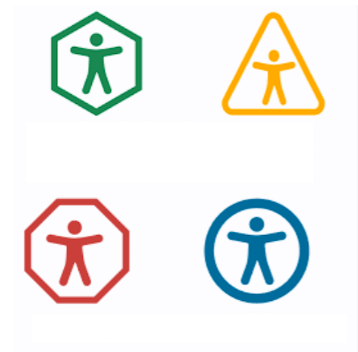
Students are also presented with a Panorama icon (person inside a circle) to signal when alternative formats of content are available, making it easier to access content in formats that work best for them.
For details, contact accessibility@arizona.edu or visit UA Accessibility's Yuja Panorama webpage (opens in new tab).
Improved Support for Anonymous Discussions
Instructors with permission to view anonymous post authors can now see anonymous discussion posts when assessing individual learners and viewing discussion statistics.
Previously, although these instructors could reveal the author of an anonymous post within the discussion, those posts were excluded from assessment and statistics views.
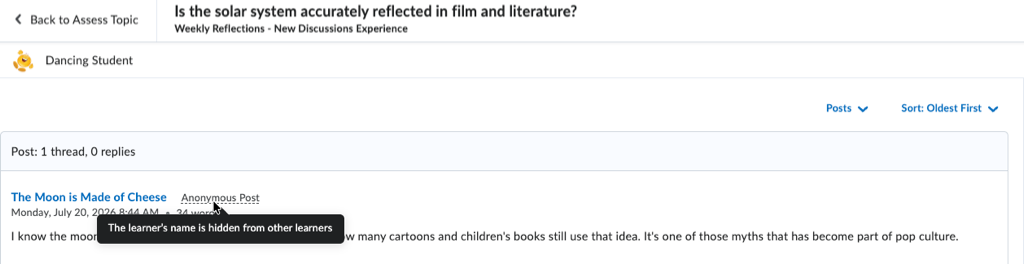
Learners also now see an Anonymous Post label on their own anonymous submissions, along with a reminder that their identity remains hidden from classmates but visible to instructors.
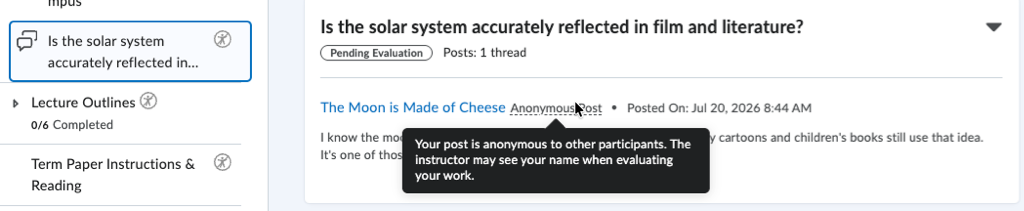
These updates provide greater transparency for both instructors and learners while preserving peer anonymity.
Cleaner Look for Embedded Activities
Embedded LTI activities, including H5P content, will no longer display the default gray border in Brightspace Content. This visual update creates a cleaner, more seamless experience without changing how activities are added or function.