
FeedbackFruits Discussions
Overview
FeedbackFruits offers two types of discussion tools to stimulate discussion between students: Discussion on Work and Discussion on Topic. Below is a brief overview of both of the discussion tools and how they provide different learning experiences.
Note
The Peer Review tool can also be used as a discussion tool, especially when the discussions are happening within groups. See the Peer Review help page for more information about FeedbackFruits Peer Review.
Discussion on Work
Discussion on Work creates a discussion space in which the conversation is centered around a student submission. Submissions can include documents, audio/video, images, links to websites, and screen sharing. After each student makes their submission, students engage in structured peer discussions about their peers' work. Optionally, after students have completed their assigned discussions, they can move into an open discussion space in which they can review submissions made by all of their classmates. Submissions can be made individually by each student or per group. Discussions can happen individually, within groups, outside of their group, or as a group.
To enhance your understanding on the functionalities of the Discussion on Work tool, visit the:
- UCATT Help Article - Discussion on Work
- FeedbackFruits Help Article - Discussion on Work: For Teachers (opens in a new tab).
Discussion on Topic
Discussion on Topic is similar to Brightspace discussions wherein the instructor sets a discussion prompt and students respond with an initial post to that prompt. The initial post can include text, audio/video, document attachments, images, and screen sharing. Discussion on Topic offers additional freedom in the peer discussion space in that it can allow for a freeform discussion or assigned discussion. In either case, you can dictate the number of posts each student must discuss. Both initial posts and follow-up posts can be made anonymous. Discussions can happen individually, within groups, outside of their group, or as a group.
To enhance your understanding on the functionalities of the Discussion on Topic tool, visit the:
- UCATT Help Article - Discussion on Topic
- FeedbackFruits Help Article - Discussion on Topic: For Teachers (opens in a new tab).
Selecting the Best Discussion Tool
The discussion tools in FeedbackFruits are very similar. While Discussion on Topic is meant for an instructor-created topic and initial "post" made by the student, Discussion on Work requires some form of submission.
Use Discussion on Work when you want to:
- Have students submit a screen recording, video, image, document, etc.
- Have students post a piece of media that offers features such as annotating and time-stamped commenting.
Use Discussion on Topic when you want to:
- Have students submit a written response to an assigned prompt. A text post can also support attached video, screen recording, audio, and
- Participate in a discussion tool similar to Brightspace discussions.
- Have the ability to put students immediately in an open discussion with the full course or groups.
Note
The Discussion on Topic tool supports audio, video, screen sharing, and attachments as well, so it can be useful for when you want students to submit/attach a deliverable and then immediately go into a full course discussion rather than a structured/assigned discussion.
The immediate move from submission to full course discussion is not possible in Discussion on Work. In Discussion on Work, students must first make a submission, get paired with another student(s); then they can optionally move into full course discussion.
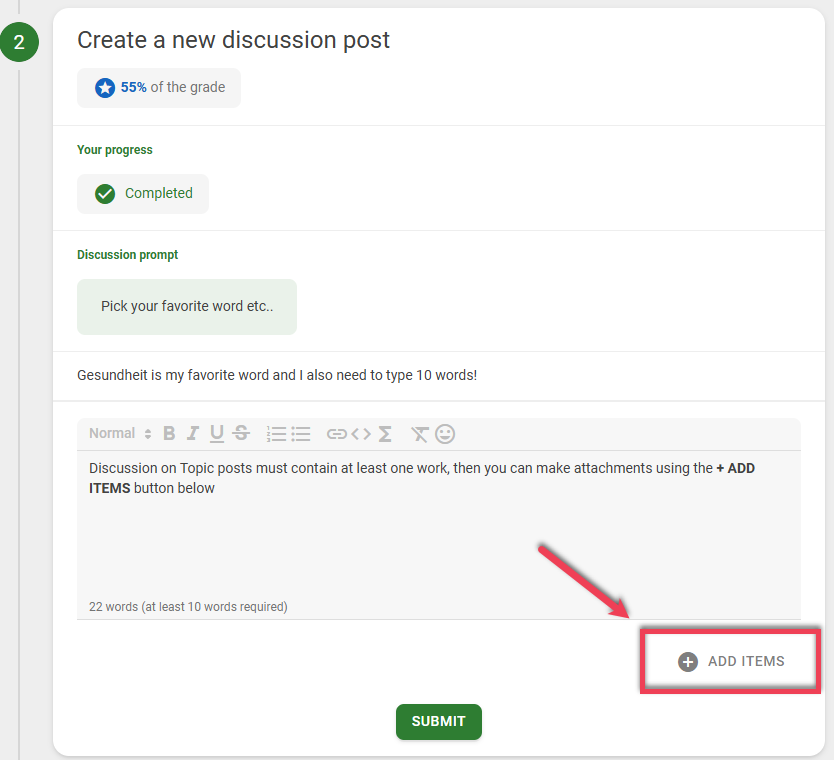
If you use Discussion on Topic as an assignment where students submit deliverables, it is recommended that you ensure students understand how to use the + Add Items feature pictured below:
The table below that compares the two discussion tools and their features:
|
Parameters |
Discussion on Work |
Discussion on Topic |
| Topic | While instructions can be given by the instructor, students discuss each other's file submissions. | Similar to a Brightspace discussion, a discussion prompt is provided by the instructor and discussed by the students. |
| Initial Post/Submission |
|
|
| Peer Discussion Allocations |
|
|
| Interactivity |
Student submissions are interactive, meaning:
|
Documents, audio, and video are treated as attachments, and therefore are not interactive. |
| Optional Steps |
|
|
Create a Discussion
From a Brightspace Content Module, select Existing Activities, then FeedbackFruits from the drop-down. Select Start From Scratch to create a Discussion and immediately insert it into the Brightspace Content Module, or select My Library to choose or create a pre-made template.
Note
For more information about inserting FeedbackFruits content into Brightspace, visit the Adding a FeedbackFruits Activity to Brightspace help page.